ArtículoEN14 min de lectura24 oct
Automate processes with multiple agents: the prompt playbook
Six prompts to design, connect and control a team of AI agents, with animated diagrams and a complete worked example from start to finish.
A single giant prompt that "does it all" works in the demo and breaks in production: you cannot debug it, it mixes responsibilities, and nobody knows which part failed. The alternative is what any team of people does: narrow roles, clear handoffs, someone who reviews, and limits nobody skips.
This playbook gives you six prompts, in the order you use them, to design that team with the help of an AI assistant and get it ready for testing. The whole walkthrough uses one example: triaging client emails at an accounting firm. An email comes in; a reviewed reply comes out, and a person approves it before it is sent. It works the same for any other process.
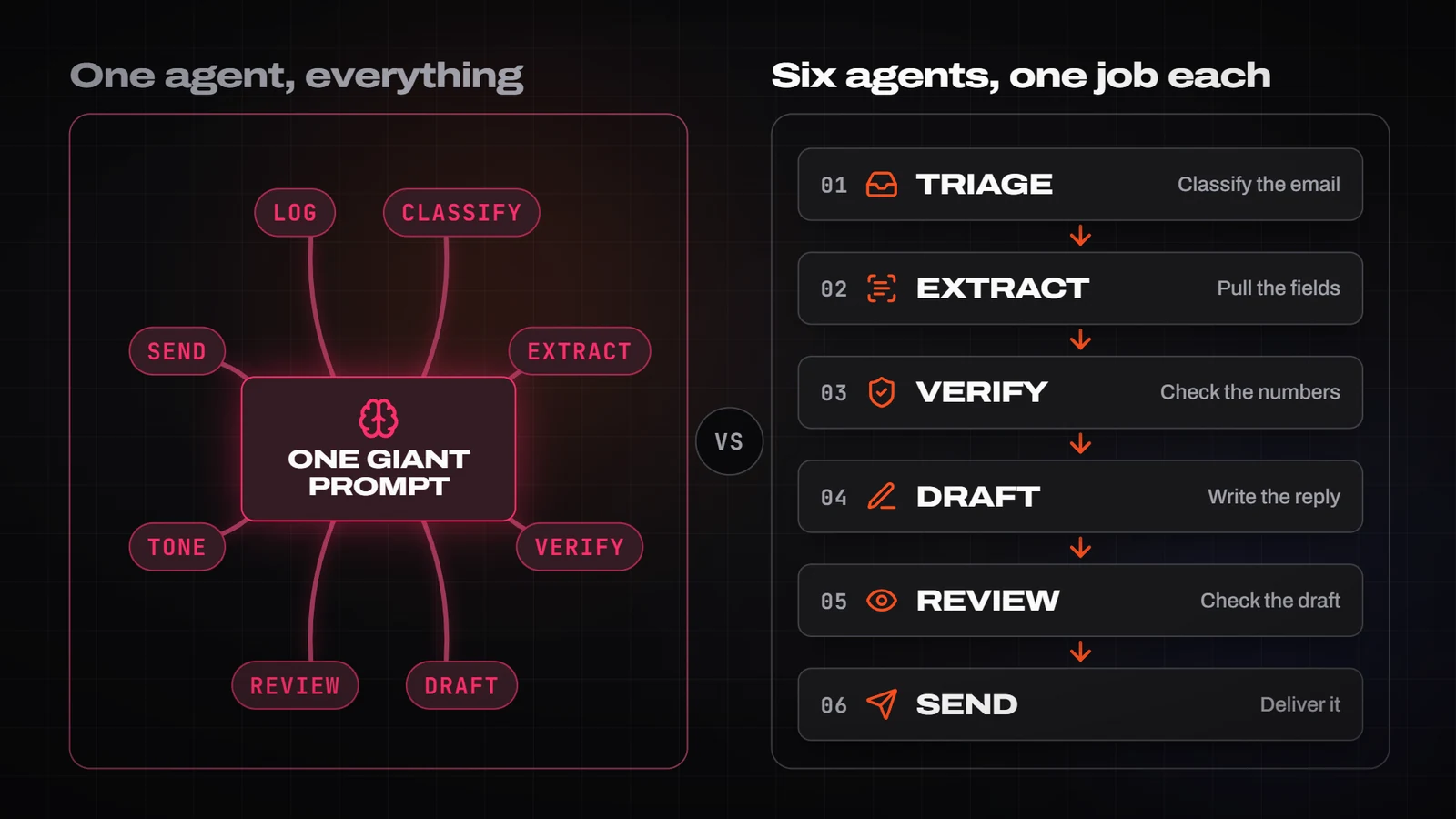
Before you start: do you need multiple agents?
If the steps are always the same, a fixed workflow that calls the model only where natural language is needed is cheaper, faster and easier to debug. Multiple agents pay off when there are tasks of a different nature (classify, extract, write, review), when whoever reviews must not be whoever produces, or when one part can fail and be retried without redoing everything else. If you are unsure, fill in the "does this process deserve AI?" worksheet in this same section first.
Anatomy of a multi-agent process
- Narrow roles. Each agent does one thing and does it well. An agent with a clear job can be tested, replaced and improved on its own.
- Typed handoffs. What one agent passes to the next is data with a schema (JSON), not a paragraph. It can be validated automatically, and errors are caught at the boundary, not three steps later.
- A review gate. An agent other than the one that produced the result evaluates it against explicit criteria and can reject it with a reason.
- Limits and a human in the loop. Maximum steps, retries and cost; minimal permissions; and human approval before any irreversible action (send, pay, delete).

The six prompts
Use them in this order, in a single conversation with a capable model: the output of each one feeds the next. Replace what is between double braces (for example {{process}}) with your own case. Every block has a copy button.
1. Decompose the process into agents
Start from a process described the way a person would do it and ask for it to be split into agents with a single responsibility each. What you get: the map of the team.
You are a multi-agent systems architect. I am going to describe a process and I want you to design it as a team of AI agents.

Process: {{process}}
Input: {{input}}
Expected result: {{output}}
Constraints (legal, privacy, time): {{constraints}}

Do this, in order:
1. List the steps an expert person would take, without thinking about AI yet.
2. Group them into agents. For each agent: one single responsibility, a one-verb name (Triage, Extractor, Verifier, Drafter, Reviewer...), what it receives and what it hands over.
3. Mark which steps should NOT be an agent (fixed rules, calculations, database lookups) and which tool or script solves them better.
4. Say where there must be a review gate and where a human approval, and why.
5. Return a table: agent | responsibility | input | output | tools | main risk.

Rules: do not invent steps I have not mentioned; if something is unclear, ask me before designing. Prefer fewer agents to more, and justify each one with a failure it prevents.
2. Specify each agent’s role
With the map in hand, write the system prompt for each agent. The narrower it is, the better the agent behaves. Ask for it once per agent in the same conversation, so they share vocabulary.
Write the system prompt for the agent "{{agent}}" of this team:

{{team_map}}

Required structure:
- MISSION: one sentence.
- INPUT: what it receives, with a real example.
- OUTPUT: the exact JSON it must return (if there is no schema yet, propose a minimal one; we will refine it in prompt 3).
- RULES: what it ALWAYS does and what it NEVER does, written as verifiable checks, not adjectives.
- WHEN TO STOP: situations where it does not act and returns "needs_human" with the reason.
- EXAMPLES: two correct cases and one edge case with the ideal answer.

Rules: 350 words at most, no motivational language ("you are the best..."), no permissions the agent does not need.
3. Define the handoff contract
Failures in a multi-agent system are almost never inside an agent: they are between them. The contract fixes which data travels and when it is valid, and lets you reject malformed input instantly without spending a model call.
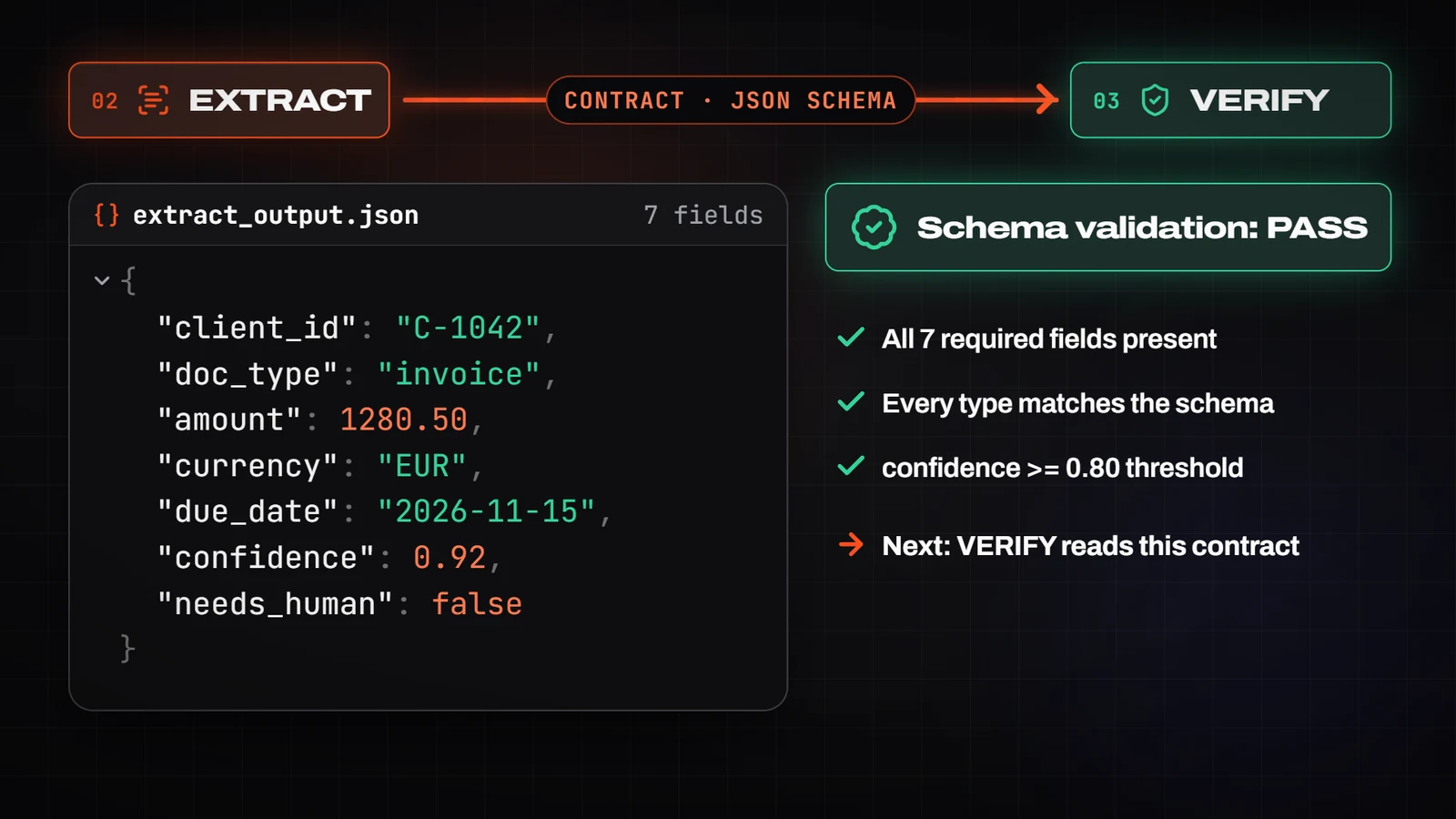
Define the handoff contract between the agent "{{source}}" and the agent "{{target}}".

Team context:
{{team_map}}

Give me:
1. A JSON Schema (draft 2020-12) with types, required fields, formats (ISO dates, numeric amounts with currency) and closed enumerations.
2. One valid example and two invalid ones, with the reason each fails.
3. The control fields that ALWAYS go: "confidence" (0 to 1), "needs_human" (boolean) and "reason" (short text if needs_human is true).
4. The checks the code (not the model) must run before handing over: ranges, consistency between fields, allowed values.

Rules: no free-text fields unless essential; if there is free text, cap its length.
4. The review gate
The reviewer cannot be whoever produced the result, nor share its context of "why I did it this way". Give it only the original input, the result and the criteria. Limit retries (two is usually enough) and, if it still rejects after the second, escalate to a person instead of insisting.

You are the reviewer of the agent "{{reviewed_agent}}". You do not collaborate with it: your job is to find reasons to reject its result.

Original input:
{{input}}

Result to review:
{{result}}

Criteria (each one is a yes-or-no check):
{{criteria}}

Return ONLY this JSON:
{
  "verdict": "approve" | "reject",
  "failures": [{"criterion": "...", "evidence": "literal quote from the input or the result", "fix": "concrete instruction"}],
  "not_verifiable": ["what you cannot check with what you have"]
}

Rules:
- Reject if any criterion fails. There is no "approved with reservations".
- Every failure carries a literal quote as evidence; without a quote it is not a failure.
- If everything passes, return "failures" empty. Do not invent problems to look rigorous.
5. Orchestrator, failures and limits
The orchestrator decides the order, the retries and when to stop: it is what turns six agents into a process. Important: the limits are enforced by your code or your platform, not by the model itself. A prompt that says "do not spend more than 5 euros" is not a limit.
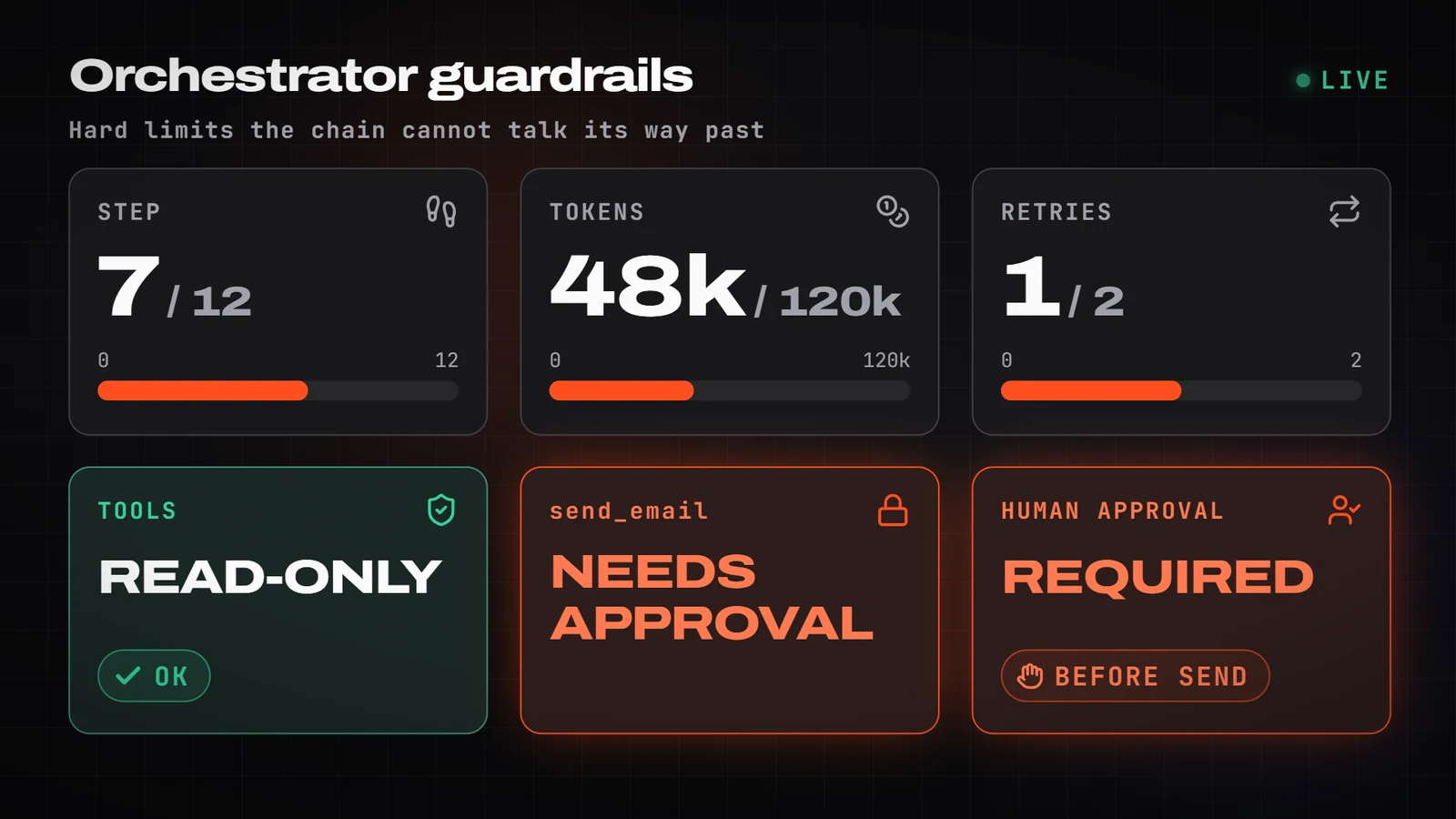
Design the orchestration policy for this team of agents:

{{team_map}}

For each step, define:
1. Entry and exit condition.
2. What happens if the contract validation fails: how many retries and with what change (rephrase, add more context, switch model).
3. What happens if the reviewer rejects: maximum rounds and when to escalate to a person.
4. Global limits: maximum steps, token or cost budget, maximum time.
5. Permissions per tool: read, write, and which require explicit human approval (send, pay, delete).
6. Logging: what is stored for each run so that what happened can be reconstructed (inputs, outputs, verdicts, cost).

Deliver a text diagram (mermaid) and a table of limits. Rule: when in doubt between acting and escalating, escalate.
6. Test plan
Before leaving it on its own, test it with cases whose correct answer you know (a "golden set") and with cases designed to break it. Run the set every time you change a prompt: if the reviewer lets through a case it should have rejected, that is the first fix.
Generate a test plan for this multi-agent process:

{{team_map}}

Create:
1. 10 representative normal cases, with the input and the expected result.
2. 10 edge cases: incomplete data, contradictory data, another language, very long input, typos.
3. 5 adversarial cases: attempts to make an agent ignore its rules (instructions hidden in the input text, out-of-scope requests).
4. For each case: which agent should catch it and which result is acceptable (including "escalate to a person").
5. A success metric for the set: percentage of correct cases, the reviewer's false-approval rate and average cost per run.

Return a table. Do not generate real personal data: use fictitious names and amounts.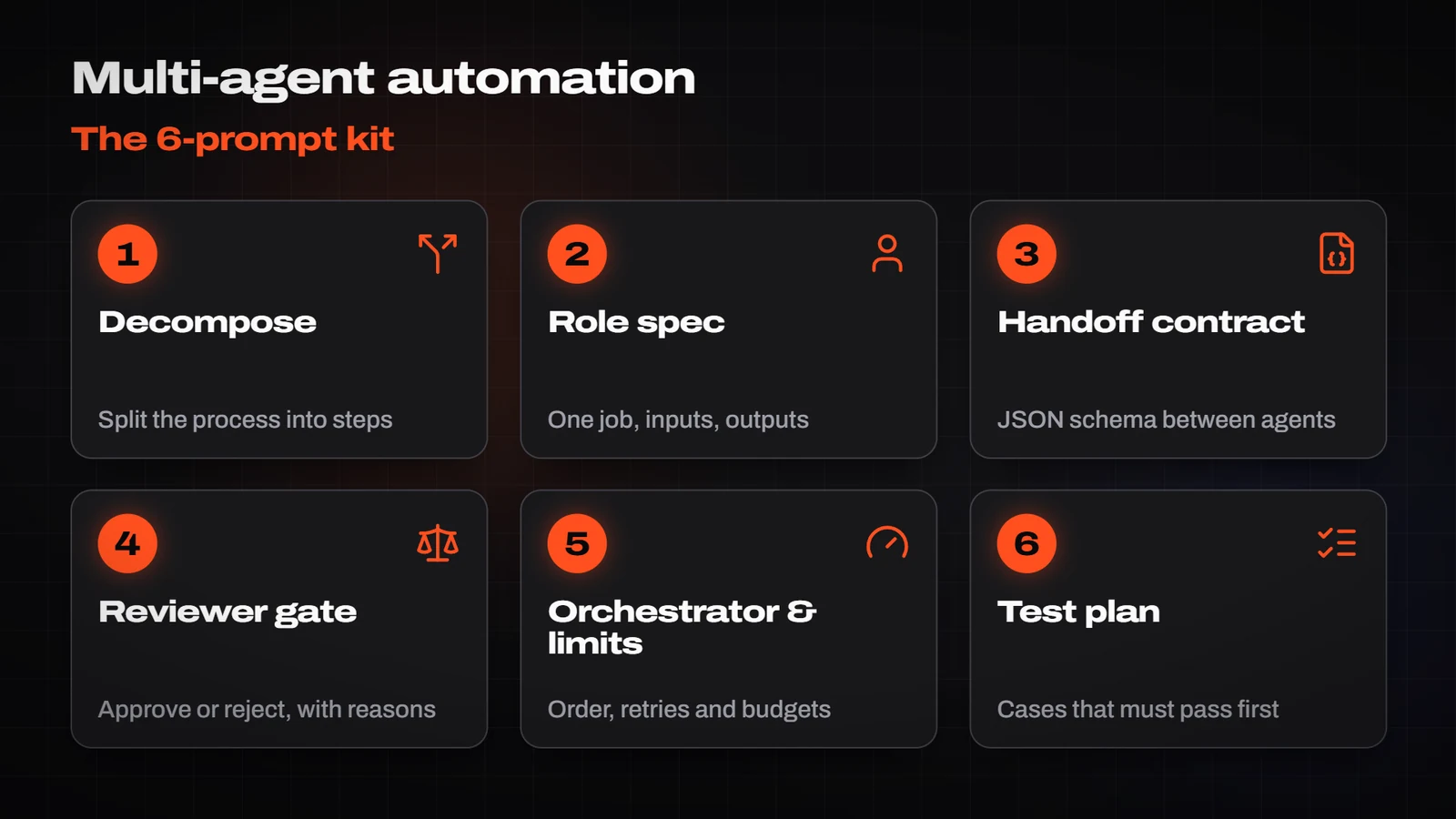
The full example, in one pass
Applied to the accounting firm, the six prompts give you this team:
- Triage classifies the email (invoice, query, urgent, spam) and writes nothing.
- Extractor pulls out typed data: client, document type, amount, due date.
- Verifier checks against fixed rules and the client list. Whenever possible, it is code, not AI.
- Drafter prepares the reply using the firm’s template.
- Reviewer applies the review gate: does it quote a deadline that is not in the email? Does it promise something the firm does not offer?
- A person approves. Only then is it sent.
Five mistakes that keep repeating
- The all-knowing agent. If its instructions fill a page, it is three agents.
- Handoffs in prose. "Here is a summary" cannot be validated; JSON with a schema can.
- The reviewer is the author. Whoever produced the result tends to approve it.
- Limits that live in the prompt. Cost, step and permission caps are enforced by code.
- No human on the irreversible. Sending, paying and deleting always ask for approval.
Pre-production checklist
- Every agent has a one-sentence mission and an example input and output.
- Every handoff is schema-validated before moving on.
- The reviewer is independent and its failures cite evidence.
- There is a maximum of steps, retries and cost, enforced by code.
- Irreversible actions require human approval.
- Every run is logged.
- There is a test set and it runs on every change.
¿Te ha servido?
Cada día un Short nuevo y, cuando toca, un tutorial a fondo. Suscríbete y no te pierdas el siguiente.